
Dreamland Slams Lab Leaders
by Pixeleen Mistral on 18/09/07 at 10:58 pm
“There is no leadership evident at Linden Lab” – Master Quatro
by Pixeleen Mistral, National Affairs desk
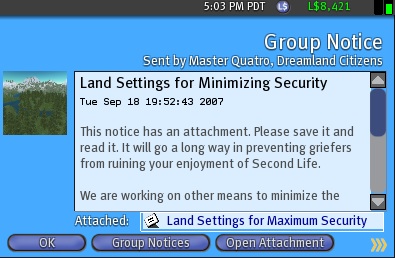 Second Life’s largest land baron – Anshe Chung’s Dreamland – broke ranks with the fanboy-dominated SL media today and sent a group notice to Dreamland customers slamming the Linden game gods for lack of leadership in the seemingly endless anti-griefing battles.
The notice included instructions for land permissions settings that “go a long way in preventing griefers from ruining your enjoyment of Second Life” according to Dreamland honcho Master Quatro. These instructions are reproduced at the end of this article – but caution is advised since you could accidentally auto-return a carefully crafted water feature/pose ball collection from that special skybox hideaway. Then where would you cyber?
Mr. Quatro went on to say, “We are working on other means to minimize the impact of these attacks. This should be an effort led by Lindens. Unfortunately there is no leadership evident at Linden Lab. They won’t address the issue on a blog even”.
The Herald staff have also noticed a curious silence on the official Linden communication channels – perhaps the Lindens are busy staring up at the windlight sky eye candy they have been working on? Some might suggest that Master Quatro is getting slightly rattled, since his group message was titled “Land Settings for Minimizing Security” but the attachment talks about maximizing security. It must have been one of those days in Dreamland – or perhaps the Herald’s typesetter Audrey is moonlighting again.
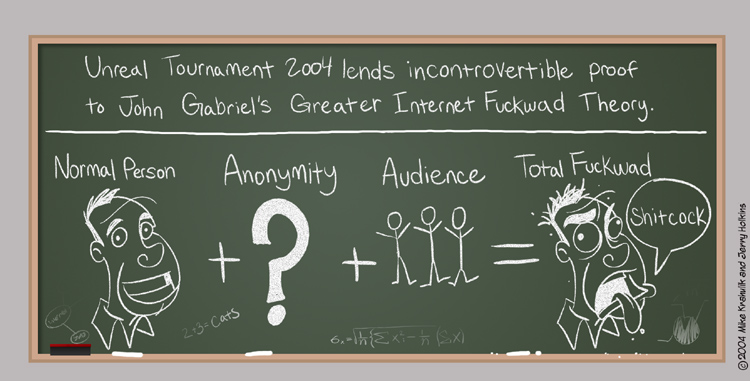
True leadership could entail significant change – and even mean moving back to a paying customer-only business model – tacit acknowledgement that Second Life is subject to John Gabriel’s Greater Internet Fuckwad Theory. Why it is desirable to have unlimited numbers of players with at most an e-mail address on file – then give them tools to “create content” – any sort of content – at the expense of other players remains one of the most enduring mysteries of Second Life. The office cat often seems to ponder this as she scratches endlessly in her catbox.
Land Security Settings
The recent wave of griefer attacks has demonstrated that too many land owners still do not have security settings enabled on their land. Please follow the guidelines below and encourage all land owners in your sim to do the same. Do not ever open any attachment or allow anything to animate you unless you are sure of who is asking.
For Residential and Land not requiring the use of scripted objects:
1. Right click the land, select “About Land”, and then select the “Options Tab”.
2. Do NOT place a checkmark in the “Edit Terrain” checkbox.
3. For “Create Objects”, do NOT place a checkmark in “All Residents”, but DO place a checkmark in “Group”.
4. For “Object Entry”, do NOT place a checkmark in “All Residents”, but DO place a checkmark in “Group”.
5. For “Run Scripts”, do NOT place a checkmark in “All Residents”, but DO place a checkmark in “Group”.
6. For “Restrict Pushing”, DO place a checkmark in the checkbox.
For Commerical Land and Land requiring the use of Scripted Objects:
1. Right click the land, select “About Land”, and then select the “Options Tab”.
2. Complete the settings listed for Residential Land.
3. For “Run Scripts”, DO place a checkmark in “All Residents”, and DO place a checkmark in “Group”.
To further fight griefing, you may decide to set Auto-return, which returns objects not belonging to the land owners or the group members.
Enabling Auto Return:
WARNING: Before proceding, YOU MUST “SET” YOUR OBJECTS ON THE LAND TO EITHER THE LANDOWNER’s name, OR THE GROUP’S NAME. If you do not do this, and you enable “Auto Return”, OBJECTS MAY BE RETURNED!
When rezzing an object for the first time, if you are wearing your group owner’s tag, the object will not return. For objects already rezzed, wear your group owner’s tag and “right click the object/edit/general tab/press “Group Set” Button/select the group. After ALL objects have been set to group, THEN you are safe to turn Auto-Return on.
Right click the land, select “About Land”, and then select the “Objects Tab”. You will see a white text field with the text label: “Autoreturn other residents’ objects (minutes, 0 for off):”
Enter a value of “1″ in this field.
Now your land is set to fight griefer attacks.
Group Notice From: Master Quatro
This notice has an attachment. Please save it and read it. It will go a long way in preventing griefers from ruining your enjoyment of Second Life.
We are working on other means to minimize the impact of these attacks. This should be an effort led by Lindens. Unfortunately there is no leadership evident at Linden Lab. They won’t address the issue on a blog even.
Please implement these suggestions and hopefully we will all be better protected.
MQ


Free xxx.
Jan 16th, 2009
Free xxx.
Free xxx.
grinch
Jul 25th, 2011
I’m just going to give a friendly reminder that these settings are actually useless, the best security is adult settings oh wait they nerfed that recently too. ooooook Let me just make this clear, no-script “5 ways to break that i know of right now” no-rez “2 exploits right now” group security “2 exploits” no-push “too many to list, this is even found in anti griefer huds believe me people try everything to get rid of us example-phenom does it great” no-object entry “just attach the spam or no script no rez ect to your body and presto instant mayhem.
copybot viewers are not even the problem as it resides in lsl, most viewer based attacks are lsl based attacks just thrown in for lulz.
I would also like to point out the source of all the trouble did not originate with us, think insilico cds and redzone. The ignorance of the lab is astounding, you created griefers by turning a blind eye to these peoblems and allowing certain people who don’t even work for the company too much power over people, you even condoned cds which uses an exploit to grab ip addresses from users of a video game. There is only one way outa this listen to your public….stop listening to the special interests of land barons and creators who need the status quo to make a living off a video game.
Its simple science, 9 months ago being a griefer was a pain in the ass only those of us who really know what we are doing could pull hits on protected targets. oh crap i gotta run waterhead is back online LOLz
grinch
Jul 25th, 2011
@ provky
Actually the damage we can cause is in some cases quite extreme, I think at least 40 or 50 sims in dreamland was either crashed or spammed to death the other night. No rez no script replicators are really killer so Keep dreaming hagapuss, i think all us goons and niggras know what your all about and how to deal with you. Glad to hear that your still alive……where is your sim i wanna come……erm talk
  hehhehehehe
@Sloosers
lemme break it down in numbers over the last month
Attacks on pathetic no name maifa’s 10%
Sandboxes crashed in the name of lulz 20%
Attacks on bloodlines because tru noobs suck ass -10%
Attacks on insilico for cds and just being an arrogant niggra hating sloppy bitch’s %20
Weapons testing 2%
Attacks because someone was stupid enough to open their mouth, get in the way or be found here runnin their mouth 30%
Attacks on certain people of interest or lindens 8%
And please stop feeding the trolls it makes it so much more fun when we have to work for the lulz, its like the best game ever you have no idea really, you play second life we play second troll, fuck life whatever ya wanna call it. So the lesson here is
1. Pray and beg the lindens to make a better wurld
2. Go smoke a joint and relax
3.????????
4.Go fuck yourselfs to death
5.PROFIT
Nelson Jenkins
Jul 25th, 2011
Oh man, just under 4 years, I think we’re starting to see a competition for the record here.